


An application can pass its tests while its installation process has already done something the team never intended. That is the uncomfortable part of dependency security: installing, building, testing, and running an application are all opportunities to execute code. A vulnerability report checked afterward cannot undo an earlier credential exposure.
A September r/node discussion about stopping malicious packages before they run captures the practical question. The author already committed a lockfile, used npm ci, and scanned dependencies. They wanted to know what changes the situation before a newly compromised version appears in an advisory database.
The useful answer is a series of explicit boundaries. Decide which dependency versions may enter, which installation scripts may execute, what credentials the build receives, and what the deployed process can access. Each boundary needs a small verification exercise. Otherwise, a reassuring configuration can remain an untested assumption.
This guide uses a harmless local package to demonstrate the installation boundary. It does not download malware, read credentials, or contact an external service. The example was checked with Node 22.12.0 and npm 11.0.0. Release-age configuration is discussed separately because support varies across npm releases.
Download the complete runnable examples, including setup instructions and verification commands.
Separate the four decisions a dependency creates
Consider a hypothetical image-processing dependency. Your application imports it to resize uploads. Installing the package may invoke a setup script. Building the application may invoke its command-line tool. Tests may import it. Production requests may execute its implementation. Blocking one of those paths does not automatically block the others.
Write those paths down before changing tooling. For each one, name the trigger, the machine, the available files, and the credentials present. A development laptop with a cloud login and a build runner with a publishing token represent different consequences, even when they install the same tarball.
Keep the distinction between identity and behavior clear. A checksum can establish that downloaded bytes match an expected artifact. It cannot establish that the expected artifact behaves acceptably. A version can be reproducible and still contain unwanted code. These distinctions help explain why teams need several controls without expecting any individual control to solve the entire problem.
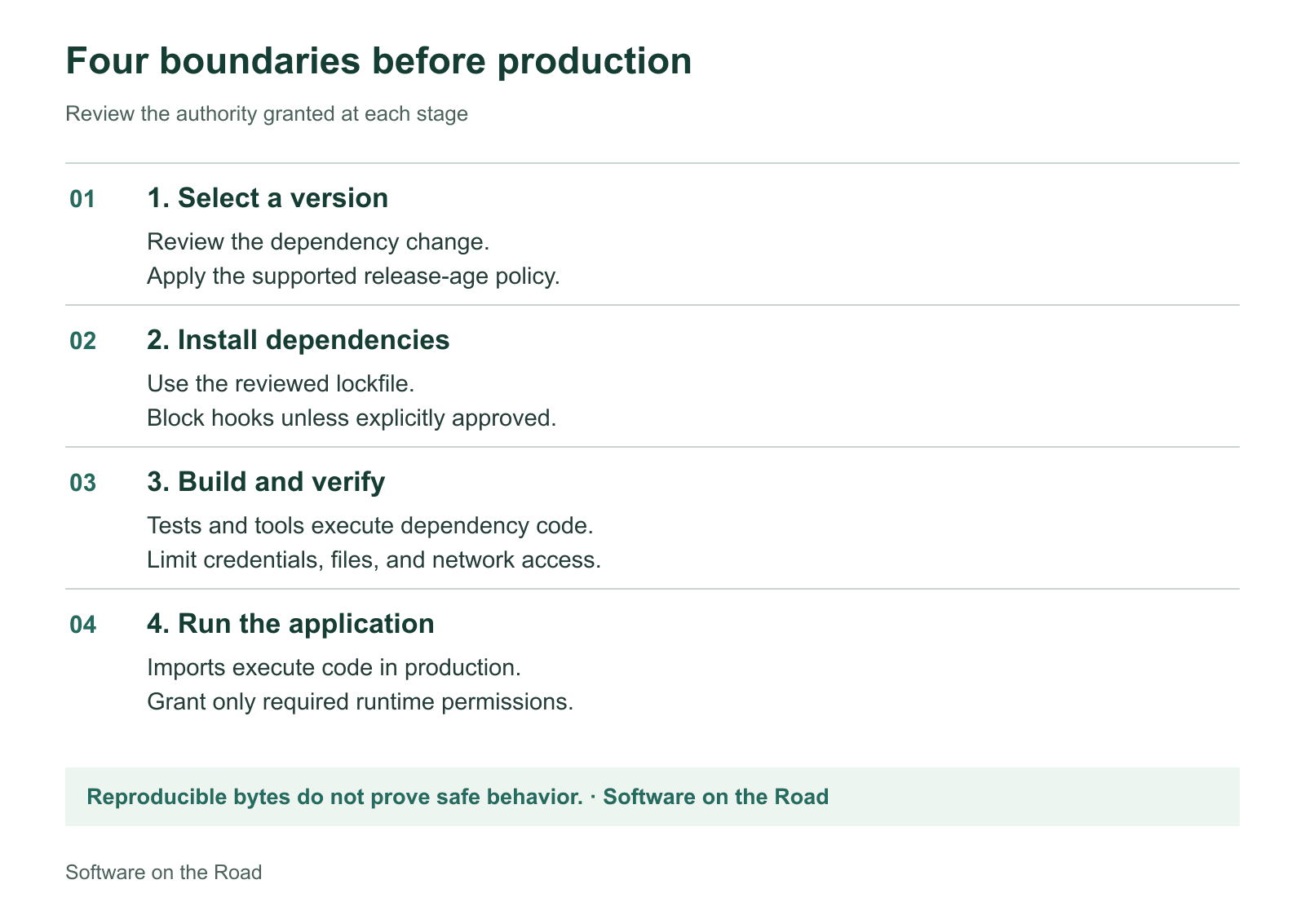
Review the authority granted at each execution stage. Passing an earlier check does not grant unlimited access at the next stage.
Establish a reproducible baseline
Commit the manifest and lockfile together. Use a clean installation in continuous integration so the runner does not quietly update the agreed dependency tree. According to the npm ci documentation, the command requires a lockfile, fails when it disagrees with the manifest, removes existing node_modules, and leaves the manifest and lockfile unchanged.
Start with these commands in an existing project whose lockfile is already reviewed:
npm --version
node --version
npm ci --ignore-scripts
git diff --exit-code -- package.json package-lock.json
The final command checks the repository state; it is not a dependency scanner. Record the Node and npm versions in your build setup so a later installation uses the same intended toolchain. If the project uses npm-shrinkwrap.json, include that filename in the comparison instead.
Give dependency updates their own review surface. A useful pull request explains why the update exists, identifies important transitive changes, and states whether installation behavior changed. A large unexplained lockfile diff deserves investigation even when the direct dependency change looks small.
Imagine reviewing a routine patch that also introduces a new binary downloader. The release may be legitimate. The important engineering question is whether the new behavior fits the environment where the team plans to execute it. That question is easier to answer in a focused dependency change than in an unrelated feature pull request.
Make installation scripts an explicit boundary
Package lifecycle hooks can run during installation; the npm lifecycle documentation describes the relevant events. A postinstall hook is a program, with the authority of the process invoking it. Treat it as an execution decision rather than harmless package metadata.
For a conservative starting point, set ignore-scripts=true in the project's .npmrc and install with npm ci --ignore-scripts. Explicit commands such as npm test still execute their requested script. This setting does not prevent an application from importing dependency code later. The precise behavior is documented in npm configuration.
Some projects require native compilation or generated artifacts. Diagnose that requirement instead of switching off the boundary for every package. Identify the exact package and version, inspect the required operation, run it in a restricted build environment, and document how its output is consumed. Current package managers offer different approval mechanisms; use the documentation matching the version your team actually pins.
Do not treat a successful application startup as evidence that all skipped steps were unnecessary. Exercise the features that depend on native modules, browser downloads, generated clients, or platform-specific binaries. A setup change can affect a rarely used path while leaving the home page perfectly healthy.
Verify the boundary with a harmless local package
The following fixture makes installation visible by creating one local marker file. It never reads environment variables, opens a network connection, or touches files outside the fixture. Its purpose is to give the team an observable signal.
{
  "name": "sotr-benign-install-fixture",
  "version": "1.0.0",
  "scripts": {
    "postinstall": "node postinstall.cjs"
  }
}
// postinstall.cjs, inside the fixture package
const fs = require('node:fs');
const path = require('node:path');
fs.writeFileSync(path.join(__dirname, 'marker.txt'), 'postinstall ran\n');Create the fixture in a disposable directory, package it with npm pack --ignore-scripts, and install that local tarball in a separate empty application. Start with scripts disabled. Confirm that the dependency is installed and the marker is absent. Then use the same lockfile to perform an ordinary installation and confirm that the marker appears.
The companion install-boundary-lab.mjs automates those steps offline, including its assertions and cleanup:
node install-boundary-lab.mjsThe verified result is deliberately narrow: a suppressed install hook does not create the marker; an ordinary npm ci does execute that hook; both use the same unchanged lockfile. This demonstrates the boundary without making a claim about unknown packages. You can keep the exercise as an onboarding check whenever the package manager or build environment changes.
Pay attention to what the exercise disproves. A frozen lockfile alone does not disable installation scripts. Likewise, turning off scripts during dependency installation does not make an explicitly invoked build tool trustworthy. Repeat the question at the next execution stage.
Inventory scripts before approving exceptions
Make the review workload visible. npm lockfiles can identify entries with installation hooks through hasInstallScript; the lockfile reference describes that metadata. The following inventory handles lockfile versions two and three:
import { readFile } from 'node:fs/promises';

const lock = JSON.parse(await readFile('package-lock.json', 'utf8'));
if (![2, 3].includes(lock.lockfileVersion) || !lock.packages) {
  throw new Error('Expected an npm lockfile version 2 or 3');
}
for (const [location, pkg] of Object.entries(lock.packages)) {
  if (location && pkg.hasInstallScript) {
    console.log(location, pkg.version);
  }
}
This is a review queue, not a malware detector. A package absent from the inventory can still execute when imported. A package present in it may perform an entirely legitimate task. Avoid turning the number of hooks into a security score.
For each exception, record a reason and an owner. For example: the application needs a native image codec; its build runs in a disposable job; the approved version is specific; and an engineer owns the next upgrade. A useful exception has an expiry or review trigger. A comment saying that the build broke once is unlikely to help the next maintainer make a sound decision.
Add a release cooldown with an emergency path
A cooldown gives newly published versions time to receive scrutiny. It does not inspect behavior, and an old package can remain malicious. Current npm documentation defines min-release-age in days. For an npm release supporting it, a project policy can contain:
ignore-scripts=true
min-release-age=7
Verify support against the actual CLI. The local npm 11.0.0 used for the lab did not expose this setting, so the companion capability check intentionally fails on that version. Do not copy a current documentation example into an older toolchain and assume it is enforced.
import { spawnSync } from 'node:child_process';
const result = spawnSync('npm', ['config', 'list', '--json'], {
  encoding: 'utf8'
});
if (result.status !== 0) throw new Error('Could not inspect npm');
const config = JSON.parse(result.stdout);
if (!Object.hasOwn(config, 'min-release-age')) {
  throw new Error('Pin an npm version supporting min-release-age');
}
The npm release-age reference also explains exclusions and interactions with security fixes. A cooldown can delay an urgent patch, so define a reviewed exception process. Check its behavior with a disposable dependency update before relying on it in CI. Avoid assuming every package manager uses the same setting name or unit.
Think through two update requests. A routine utility update can usually wait. A fix for an actively exploited issue may need a narrow exception after inspecting the specific artifact. The difference belongs in an engineering decision with an owner, not in a permanent bypass added because a deadline was inconvenient.
Give builds only the authority they need
Installation controls are most useful when the surrounding job also has limited authority. Keep production database credentials, deployment tokens, signing material, and cloud administration access out of ordinary pull-request builds. Separate the job that handles untrusted code from the job that can release an artifact.
GitHub recommends minimum token permissions and careful handling of untrusted code in its secure-use reference. A small workflow boundary begins with:
permissions:
  contents: read

jobs:
  verify:
    runs-on: ubuntu-latest
    timeout-minutes: 10
    steps:
      # Keep the repository's reviewed checkout/setup steps here.
      - name: Install without lifecycle hooks
        run: npm ci --ignore-scripts
      - name: Run the reviewed test entrypoint
        run: npm test
This is a fragment to place after your reviewed checkout and Node setup, not a complete workflow. Use persist-credentials: false on checkout when later steps do not need Git credentials. The workflow permissions reference explains token scope configuration. A read-only repository token still grants access; treat its presence as part of the threat model.
Network access is another explicit choice. A package installation needs access to the approved registry or a populated cache. A later verification step may not need general internet access. Implement any restriction through the runner's actual network controls and test the services that remain reachable. A container with a network interface is not automatically an outbound firewall.
For a fully prepared offline experiment, Docker documents network controls including the none network. That can be useful for a verification phase after artifacts are available. It cannot download missing dependencies, and it is not a complete isolation strategy. Mounting cloud credentials or the host's container socket can undo much of the intended boundary.
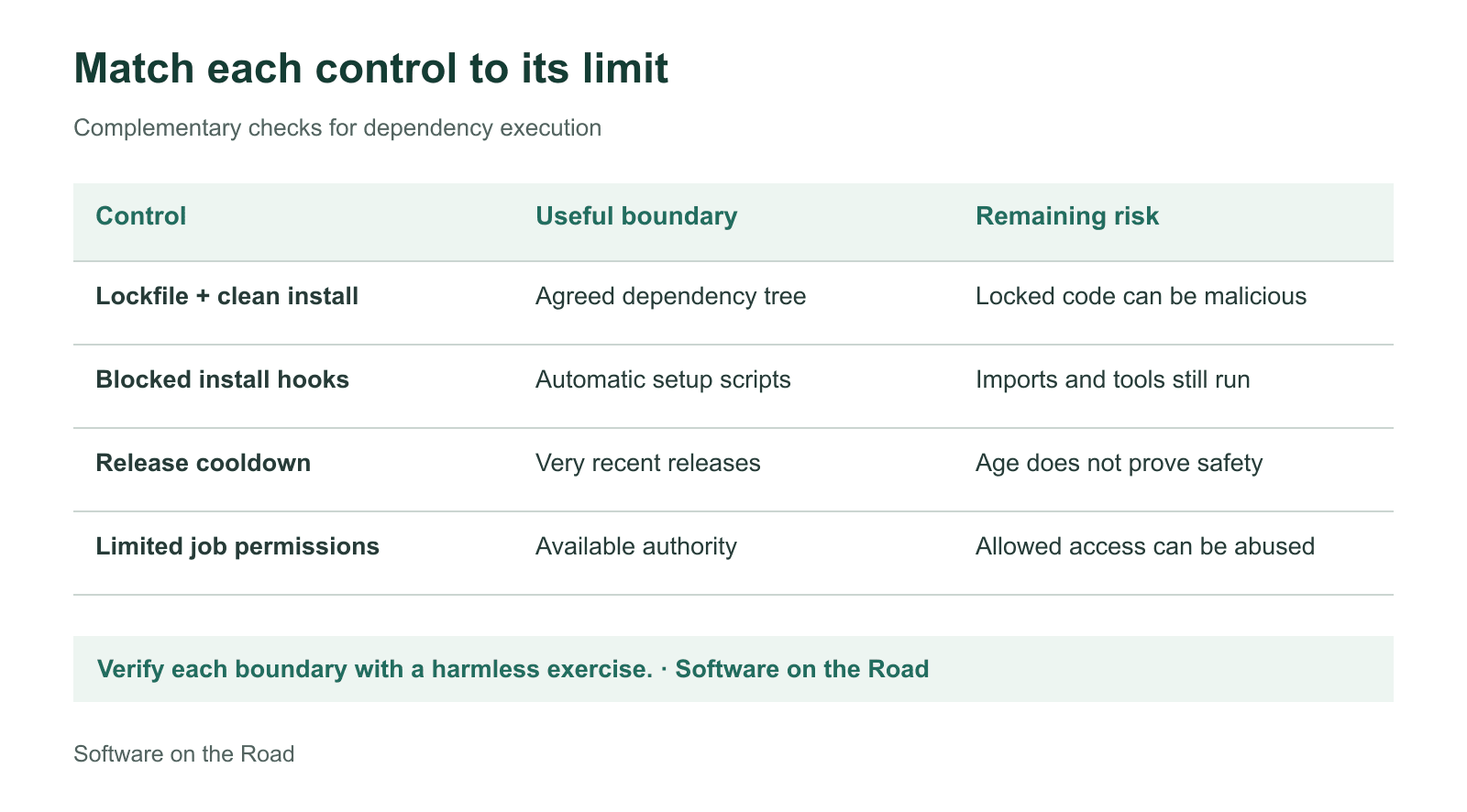
Choose controls for distinct failure modes. No row promises that an unknown dependency is safe.
Keep scanning, and prepare for the case it misses
Continue running advisory checks. The npm audit reference explains vulnerability reports and signature verification. These provide useful evidence, but a clean report is not a review of every behavior in every dependency. Signature or provenance information can help establish origin without proving that the code is benign.
Define the response before an incident. If a compromised package ran with a credential, investigate exposure and rotate the affected credential instead of assuming a subsequent package update resolves it. Preserve the dependency versions and build records needed to establish what executed. Rebuild artifacts in a clean environment after addressing the source of the problem.
Apply the same boundaries to developer workflows. A repository received during an interview, a sample project, and an unfamiliar command-line utility deserve their own execution environment. A temporary environment is useful only if it does not inherit the sensitive files and permissions you intended to protect.
Start with one application. Establish its clean install, run the harmless marker experiment, inventory required scripts, and move release credentials out of ordinary verification. Add a tested cooldown and a documented urgent-patch path. Then examine runtime access, because installed dependencies eventually become part of the running program. The result is an installation and release process whose authority you can explain and verify.


